


The 3-2-1 rule
Veeam’s rule of thumb regarding backups, which has been expanded since its first appearance to cover the new challenges of backup methodology.
To build a successful data protection and disaster recovery plan, it is recommended that you follow the following rules:
- 3: You must have at least three copies of your data: the original production data and two backups.
- 2: You must use at least two different types of media to store the copies of your data, for example, local disk and cloud.
- 1: You must keep at least one backup offsite, for example, in the cloud or in a remote site.
The additional numbers:
- 1: one of your backups must be either air-gapped, immutable or offline.
- 0: you must have zero errors when you do a restore test.
You must have at least two backups and they must be in different geographical locations - one must be secured in a way, that no one (not even you) can touch it. Practically, this means if a disaster takes out your production data and local backup, you can still recover from your offsite backup.
In practice the simplest setup would be something like this:
- Production data (Copy 1, media 1)
- Backup data on a Veeam repository locally (Copy 2, media 2)
- Disaster recovery off site (Copy 3, media 3)
Air-gapped, Immutable, Offline
Let’s look into these three terms in more detail.
Offline is probably the most straightforward: an offline storage is not accessible from any network. Not locally, not remotely. Practically, if you make a backup on a USB drive which you pull out of your machine after the backup and put it into the desk drawer that will count as an offline backup.
How does air-gapped differ from offline? Air-gapped storage can also be offline, but it also has some additional qualities. For example, the backup was written on write-once-read-more-times storage device. This would make it safer since, whoever gets hold of your backup device, they will not be able to destroy the data on it, even if the storage is reconnected and accessible from the outside word. Traditional air-gapped storages are for example tape storages.
Tape storages are written on magnetic cassettes. There are solutions out there with robotic arms which would take out the tape from the recorder after each backup, essentially taking them offline. It is easy to imagine the costs of such a system – a possible alternative is sending a technician to the data center to swap tapes each day. Depending on the available technicians at your geographical location this could make it cheaper or more expensive to maintain such a system.
Veeam does support tape storages and is often used on the enterprise level. However for smaller environments, such a system is not sustainable. For them, there is another option: immutability.
Immutable storages imitate air-gapped qualities: once the backup data is written on them, any kind of writing activity is disallowed on the storage. This can be achieved on the backup software level or on the storage level. Storage level immutability is natively supported for example on object storages. However, Veeam also offers a very simple but brilliant immutability feature if you are making use of cloud targeted backups. It is called Insider Protection.
Insider Protection
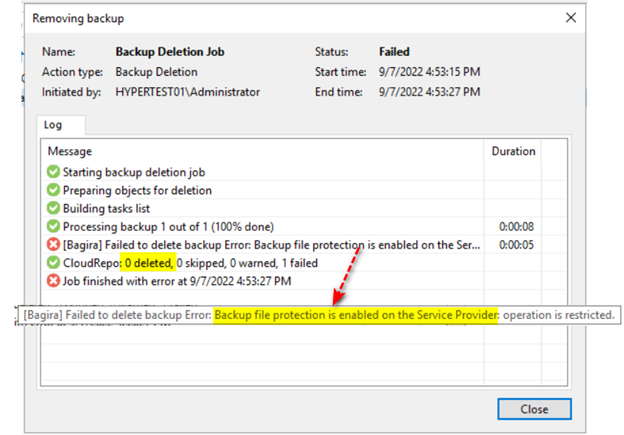
The simplest way to have an immutable copy of your backup data is a cloud copy at your service provider, with “Insider Protection” turned on. Insider Protection makes it impossible to delete the backup chain from the Veeam Backup & Replication console installed on the client’s side. Veeam simply throws an error, if the backups are attempted to be deleted from the backup chain. If the actual backup files are being touched, Veeam will place them into the secure recycle bin of the Cloud repository where the customer cannot access it. When retention deletes the backup files (which is the only way they can be deleted from the client’s side), the files also end up in the recycle bin. You get a separate retention time on your recycle bin.
In practice this means the following. In case of a ransomware attack, the malicious software may try to delete or modify your backup files. Veeam will detect this and will not allow any kind of file deletion.
What if the attack on your data comes from the inside? Say, a technician in your IT misunderstands a task, and tries to delete all your backup files. Or an employee gets terminated but HR forgets to remove their privileges and now that employee can use those access rights to cause damage and goes on to delete your production data AND your backups. This employee knows well, Veeam will throw an error on deletion, so they would just go straight for the backup files. In such a case that employee would succeed in deleting the backup files only seemingly because the files are still retained for a pre-defined amount of time safely in the Cloud repository’s recycle bin.
Hence the name: Insider Protection - Veeam protects you from threats coming from the outside AND the inside too.
Leave a Reply